For most users in 2026, Divi is the better WordPress page builder thanks to its ground-up Divi 5 rewrite, unbeatable lifetime pricing, and complete all-in-one feature set. But Elementor wins if you’re a complete beginner, depend on a large third-party add-on ecosystem, or want to start building for free. Both are outstanding tools — the right pick depends entirely on your budget, skill level, and how many websites you plan to build.
This guide is a complete, Divi vs Elementor comparison for 2026. We’ll cover pricing, performance, ease of use, design flexibility, templates, real-world use cases, and the pros and cons of each. Whether your search was “what is better, Elementor or Divi” or “elementor pro vs divi,” by the end you’ll know exactly which WordPress builder fits your project — and why.
Contents
- 1. Quick Verdict
- 2. Divi vs Elementor: At-a-Glance Comparison
- 3. What Is Divi?
- 4. What Is Elementor?
- 5. Divi vs Elementor: Head-to-Head Comparison
- 6. Divi vs Elementor for Specific Use Cases
- 7. Divi: Pros and Cons
- 8. Elementor: Pros and Cons
- 9. Final Verdict: Which WordPress Builder Should You Choose in 2026?
- 10. Conclusion
- 11. FAQs
Quick Verdict
Short on time? Here’s the fast answer, with the reasoning behind each recommendation.
Choose Divi if you:
- Build multiple websites — every Divi plan covers unlimited sites, so your cost stays flat whether you build one site or one hundred.
- Want a one-time payment — the $249 lifetime license ends recurring fees entirely, which no other major builder offers at this price.
- Need an all-in-one package — Divi bundles the theme, builder, and marketing plugins together, so you don’t stitch tools from different vendors.
- Care about long-term value — over a three-to-five-year horizon, Divi’s per-site cost trends toward zero while subscription builders keep charging.
Choose Elementor if you:
- Are a beginner — the drag-and-drop sidebar interface is the friendliest starting point in WordPress, with the shallowest learning curve.
- Want to start free — the free version is genuinely capable, letting you learn and launch a basic site without spending anything.
- Rely on add-ons — Elementor’s third-party ecosystem is the largest in WordPress, so niche widgets and integrations almost always exist.
- Build online stores — its WooCommerce widgets and store-building tools are deep, polished, and purpose-built for e-commerce.
Both builders can produce fast, professional, SEO-friendly websites. The real differences are pricing structure, learning curve, and how much value comes bundled out of the box.
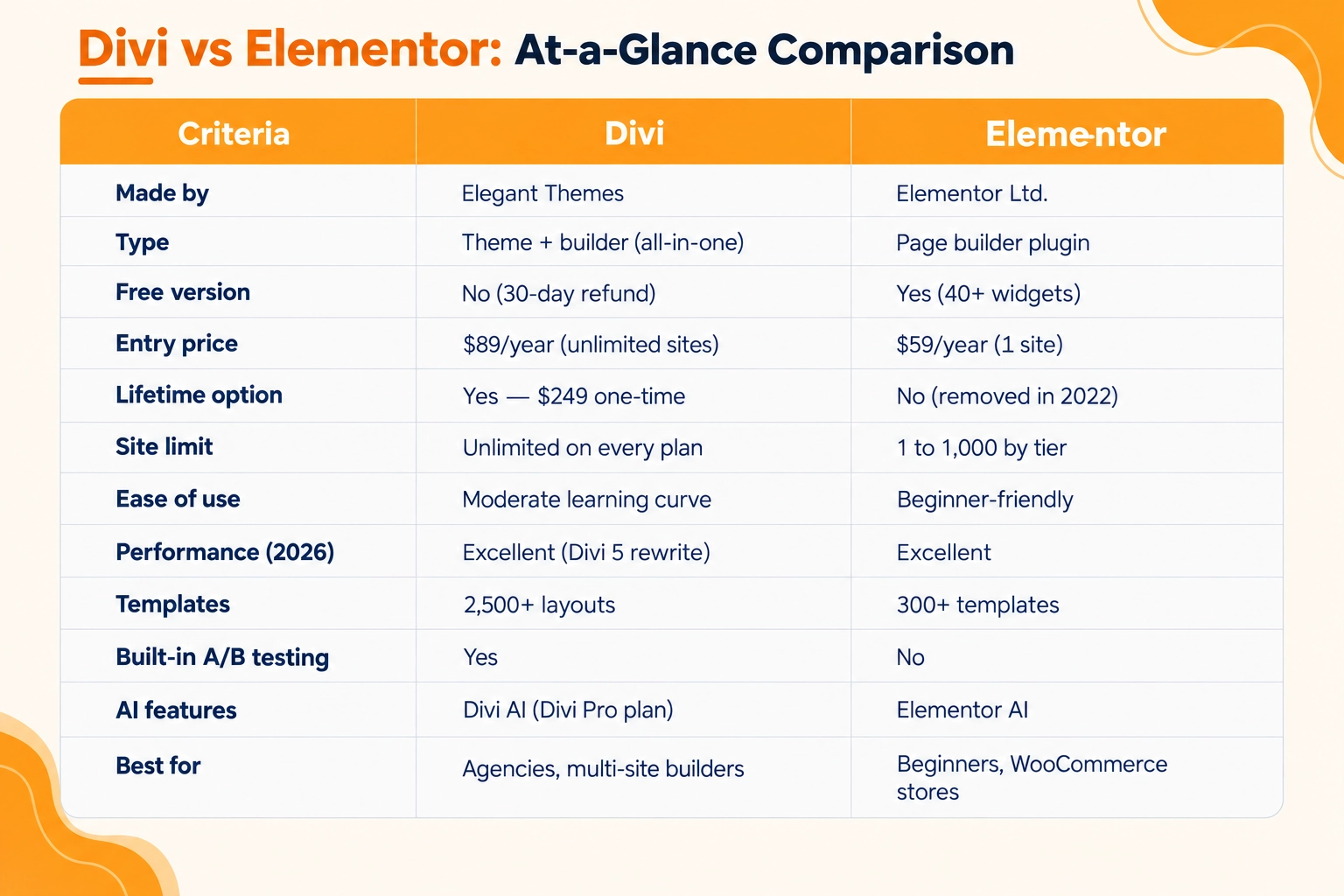
Divi vs Elementor: At-a-Glance Comparison
What Is Divi?
Divi is an all-in-one WordPress theme and visual page builder from Elegant Themes, one of the oldest and most established companies in the WordPress ecosystem. Unlike a standalone plugin, Divi is a complete package: you get a full WordPress theme, a front-end drag-and-drop builder, and a set of bonus tools — the Extra magazine theme, the Bloom email opt-in plugin, and the Monarch social sharing plugin — all under a single license with no per-site fees.
The defining 2026 development is Divi 5, which launched on 26 February as a complete ground-up rewrite. The new engine is built on modern React, generates static CSS on a per-page basis, and outputs some of the cleanest HTML of any major builder. In real terms, that translates to faster rendering, a lighter JavaScript payload, and far stronger Core Web Vitals potential than any previous version of Divi. Crucially, this all arrived with no price increase. If you formed an opinion of Divi two or three years ago, it’s now a fundamentally different product, and most older reviews no longer apply.
Divi’s positioning is simple and consistent: maximum flexibility and maximum value for one predictable price. With unlimited site usage on every plan and a genuine lifetime option, it’s designed for people who treat WordPress development as a business and refuse to let recurring software costs erode their margins.
What Is Elementor?
Elementor is the most widely used WordPress page builder plugin in the world, powering millions of live websites. It works alongside almost any WordPress theme and is celebrated for its clean, intuitive editing experience: you choose a widget from the left sidebar, drag it onto the canvas, and configure everything visually in real time, seeing changes as you make them.
Elementor’s headline advantage is its free version, which is genuinely useful for building basic pages and is the lowest-risk way in WordPress to learn design without any upfront cost. Upgrading to Elementor Pro unlocks the Theme Builder for headers, footers, and templates; the Popup Builder with triggers and targeting; the WooCommerce Builder for custom stores; more than 100 Pro widgets; and Elementor’s AI tools for generating layouts and copy from simple text prompts.
The other pillar of Elementor’s appeal is its ecosystem. Because it dominates market share, it has attracted the largest third-party add-on market in WordPress — hundreds of widget packs, template kits, and integration plugins built specifically for it. Elementor also offers its own managed WordPress hosting on Google Cloud, folding the builder and hosting into a single bundled product. In short, Elementor is a modular, beginner-first page builder with an unmatched community and add-on library, and that combination sits at the centre of the elementor vs divi decision.
Divi vs Elementor: Head-to-Head Comparison
This is the core of the comparison. Below is how the two builders handle the eight areas that most people weigh before choosing, with the facts of each approach so you can match them to your own needs.
Ease of Use & Interface
Elementor uses a fixed left-sidebar layout: you drag a widget from the panel onto the page and configure it in real time, watching changes as you make them. The workflow is familiar to anyone who has used a visual editor before, and the free version lets you learn it at no cost. Most beginners can assemble a complete page within their first few hours.
Divi 5 uses a more immersive editing canvas with no permanent sidebar, which frees up screen space and appeals to designers who work on detailed layouts. The controls are extensive, so there is more to learn upfront, and most users benefit from working through a few tutorials before the workflow feels natural. In short, Elementor has the shallower learning curve for first-time builders, while Divi’s interface suits those who want more room and are comfortable investing a little time to master it.
Design Flexibility & Customization
Elementor provides a broad, well-organised library of widgets and modules — forms, sliders, galleries, pricing tables — that you combine like building blocks. The experience is predictable and quick, which keeps everyday design work moving without friction.
Divi focuses on precision and depth. Its inline text editing and granular design controls allow very fine adjustments, and Divi 5’s rewritten engine and developer API extend it toward a full development platform rather than a straightforward page builder. If your projects call for pixel-level control, custom modules, or functionality built around a specific business, Divi offers more depth; if you want a fast, structured way to assemble standard layouts, Elementor’s modular approach is well suited.
Performance & Page Speed
For several years, Elementor was regarded as the leaner, faster option, and Divi was seen as more feature-heavy. Divi 5 changed that picture. Its rewrite introduced static CSS generation and a significantly reduced JavaScript payload, and several independent 2026 tests report Divi 5 performing strongly on like-for-like builds.
Both builders can achieve good Core Web Vitals scores when the site is properly optimised with quality hosting, effective caching, and compressed images. On very simple pages, Elementor’s output can be marginally lighter; on complex builds, Divi 5’s output is often very clean. Because page speed is a Google ranking factor, this area matters for WordPress development — and in 2026 the practical difference between the two, once each is optimised, is small. Your hosting, caching, and image handling will influence real-world speed more than the choice of builder alone.
Pricing & Licensing
Divi pricing (2026):
- $89/year — the annual plan, covering unlimited sites with every feature included.
- $249 one-time — the lifetime license for unlimited sites, which pays for itself in under three years versus the annual plan.
- $277/year — Divi Pro, adding Divi AI and Divi Cloud for teams that will genuinely use them.
Elementor Pro pricing (2026):
- Essential — $59/year — a single-site license, ideal for one personal project but limited beyond that.
- Advanced — $99/year — covers three sites, suited to freelancers with a small handful of clients.
- Expert — $199/year — scales up to 25 sites for growing studios.
- Agency — $399/year — covers up to 1,000 sites, and there is no lifetime option since it was removed in 2022.
The elementor pro vs divi math is stark. Divi gives you unlimited sites on every tier, and its lifetime license means your per-site cost trends toward zero the longer you’re in business. Elementor’s costs climb the moment you cross five or ten sites, and with annual-only billing, you renew forever. Elementor’s counter-argument is its free version, which costs nothing to start and is a real advantage for a single site. But for anyone building at scale, Divi is structurally and permanently cheaper.
Templates, Layouts & Theme Library
Divi includes more than 2,500 pre-built layouts spread across hundreds of complete website packs, all bundled with every license. That gives you a large starting library and lets you launch a site without designing from a blank canvas.
Elementor ships with 300+ templates in its own library, supplemented by a very large market of third-party template kits, some free and many paid. The kits available through outside sources add considerable variety and tend to reflect current design trends. So the difference is where the volume comes from: Divi provides a bigger set out of the box, while Elementor pairs a smaller built-in library with an extensive external ecosystem.
Third-Party Ecosystem & Add-Ons
Elementor has the largest third-party add-on market in WordPress. Because it powers such a large share of sites, specialised widgets, integrations, and template kits are widely available, which can save time on unusual or niche projects where you’d otherwise build a feature yourself.
Divi has an established marketplace as well, and Divi 5’s API is expanding what developers can build for it, though it remains smaller in absolute terms. The practical point is scale of choice: if your workflow depends heavily on plugging in third-party tools, Elementor offers more options; if you mainly work within the builder’s own features, either provides enough to draw on.
Support & Community
Both products are mature and well-supported. Elementor has a very large global community, an extensive supply of video tutorials, and active user forums, so answers to common questions are easy to find. Elegant Themes has maintained Divi for over a decade, backing it with thorough documentation, an engaged community, and established support channels.
One practical note on billing: some Elementor users have reported friction with auto-renewals and cancellation, so it’s worth reviewing those settings on the annual plans. Divi’s one-time lifetime option removes renewals altogether. On the availability and quality of help itself, the two are comparable.
Scalability for Agencies & Client Work
Divi’s unlimited-site licensing and lifetime option keep costs flat across a portfolio: building 20, 50, or 100 client sites costs the same as building one. That structure tends to suit freelancers and agencies doing high-volume, long-term client work where per-site cost adds up quickly.
Elementor is often straightforward to hand over to non-technical clients who manage their own content, and its interface can reduce support requests. Its pricing, however, scales with the number of sites, moving up tiers or renewing an Agency plan as your client base grows. The fit depends on your model: Divi’s licensing favours scale and cost control, while Elementor’s ease of handover suits client-managed sites where per-site cost matters less.
Divi vs Elementor for Specific Use Cases
Different projects have different winners. Here’s the quick guide, with the reasoning for each.
- For bloggers — Elementor’s free version is the cheapest, easiest way to launch a blog with a custom design; if you later expand into multiple sites, Divi’s value takes over.
- For small business websites — either works well, but Elementor suits those who want simplicity and a free start, while Divi suits those who want theme, opt-ins, and social sharing bundled in one license.
- For agencies and freelancers — Divi almost always wins, because unlimited sites plus the lifetime license make it dramatically cheaper across a full client portfolio.
- For e-commerce and WooCommerce — Elementor traditionally offers deeper, more polished store-building widgets, making it the default for online shops, though Divi’s WooCommerce modules handle standard stores capably.
- For custom, developer-heavy builds — Divi 5 leads, thanks to its rewritten architecture and API that turn it into more of a development platform than a page builder.
Divi: Pros and Cons
Pros:
- Unlimited sites on every plan — you never pay more as your portfolio grows, which is ideal for professionals.
- $249 lifetime license — a genuine one-time payment that eliminates recurring fees, unmatched at this price.
- All-in-one package — theme, builder, Extra, Bloom, and Monarch are included, so there’s nothing extra to buy.
- Excellent 2026 performance — the Divi 5 rewrite delivers clean code and fast rendering that rival or beat competitors.
- 2,500+ included layouts — a vast head start for launching sites quickly.
- Built-in A/B testing — split-testing is native, a feature Elementor lacks entirely.
Cons:
- No permanent free version — you’re limited to a 30-day money-back guarantee rather than an indefinite free tier.
- Steeper learning curve — absolute beginners typically need more time and tutorials to feel fluent.
- Legacy migration effort — moving older Divi 4 shortcode content can require rebuilding pages.
Elementor: Pros and Cons
Pros:
- Genuinely useful free version — you can build and launch a basic site at zero cost before committing.
- Most beginner-friendly interface — the sidebar workflow is the easiest entry point in WordPress.
- Largest add-on ecosystem — the biggest third-party market in WordPress covers almost any need.
- Strong WooCommerce tools — deep, purpose-built widgets make it excellent for online stores.
- Theme-agnostic — it works with nearly any WordPress theme, giving you flexibility.
- Optional managed hosting — bundled Google Cloud hosting simplifies setup for those who want it.
Cons:
- No lifetime license — annual renewals continue indefinitely, with no one-time escape.
- Costs scale quickly — pricing rises sharply once you manage more than a few sites.
- Per-site limits on lower tiers — the cheapest plans restrict how many installs you can activate.
- Renewal friction — some users report difficulty with auto-renewals and cancellation.
Final Verdict: Which WordPress Builder Should You Choose in 2026?
So, what is better — Elementor or Divi? Here’s the honest recommendation.
Choose Divi if you’re building more than one website, want to escape recurring costs, value an all-in-one package, or care about long-term performance and value. The Divi 5 rewrite closed the old speed gap, and its pricing is simply unmatched for anyone doing real WordPress development. For freelancers and agencies, it’s the clear winner.
Choose Elementor if you’re a beginner building your first site, want to start for free, lean heavily on third-party add-ons, or are building a WooCommerce store. Its interface is the friendliest on-ramp in WordPress, and its ecosystem is unrivalled.
If we had to crown a single best WordPress page builder for 2026, it’s Divi — the combination of the Divi 5 upgrade, unlimited licensing, and the $249 lifetime deal is very hard for any competitor to match. That said, Elementor remains a superb, beginner-first alternative, and neither choice is a mistake. A simple rule of thumb:
one free personal site → Elementor; multiple sites or professional work → Divi.
Conclusion
The Divi vs Elementor debate genuinely shifted in 2026. Divi 5’s ground-up rewrite erased its old performance weakness, and paired with unlimited licensing and a lifetime price, it stands as the best-value WordPress page builder available today. Elementor remains the friendliest starting point and the ecosystem leader — the smarter pick for beginners and anyone who wants to start for free. Whichever builder you choose, the biggest factor in your results will always be how well the site is built, optimised, and maintained.
FAQs
Is Divi better than Elementor for beginners?
Not quite. Elementor is generally the better choice for beginners because of its intuitive left-sidebar interface, shallower learning curve, and free version that lets you practise without spending anything. Divi is very capable and well worth learning, but it takes a little more time and patience before the workflow feels natural.
Which is faster, Divi or Elementor?
In 2026, it's essentially a tie. Since the Divi 5 rewrite, Divi produces very clean, lightweight code and often edges ahead on complex builds. Both can achieve excellent Core Web Vitals scores with proper hosting, caching, and image optimisation, so your setup matters more than the builder itself.
Can I switch from Elementor to Divi?
Yes, but it's a real project rather than a one-click migration. Each builder stores page data in its own format, so content generally needs to be rebuilt page by page when you move between them. Budget time for a full rebuild if you plan to switch.
Is Elementor Pro worth it compared to Divi?
It depends on scale. For a single website, Elementor Pro's $59/year Essential plan is affordable and feature-rich. But across multiple sites, Divi's unlimited licensing and $249 lifetime option make it far cheaper over time, which is why professionals managing many sites usually favour Divi.
Does Divi or Elementor have a free version?
Only Elementor offers a permanent free version, with more than 40 widgets and enough capability to build a basic site. Divi has no free tier, but every plan includes a 30-day money-back guarantee, so you can still try it entirely risk-free.