
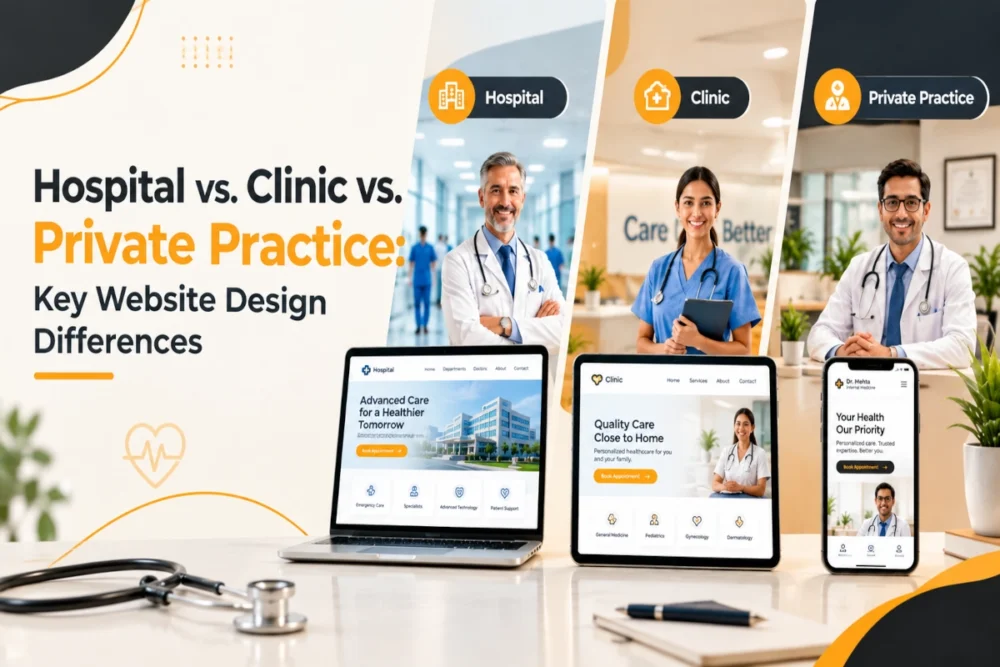
Contents
- 1. Tl;DR
- 2. Introduction
- 3. What Makes Healthcare Website Design Different?
- 4. Hospital Website Design: Built for Scale and Complexity
- 5. Clinic Website Design: Focused on Services and Conversions
- 6. Private Practice Website Design: Personal, Trust-Focused, and Professional
- 7. Hospital vs Clinic vs Private Practice: Main Differences
- 8. Key Website Features Every Healthcare Organization Needs
- 9. How Content and SEO Differ
- 10. Building Trust Through Healthcare Website Design
- 11. Common Healthcare Website Design Mistakes
- 12. How to Choose the Right Website Structure
- 13. Designing a Website Around Patient Needs
- 14. Elevate Patient Experiences With a High-Performing Healthcare Website
- 15. Choosing the Right Design Approach for Your Organization
- 16. Final Takeaway
- 17. FAQs
Tl;DR
Hospital, clinic, and private practice websites all serve healthcare audiences, but their digital requirements are different.
- Hospitals need scalable websites with detailed navigation, doctor and department directories, multiple locations, patient resources, and a broad SEO structure.
- Clinics generally need focused websites that explain services, showcase doctors, support local search, and make appointment booking simple.
- Private practices can focus more strongly on the individual practitioner, professional expertise, personal branding, and patient trust.
- All healthcare websites should be mobile-friendly, accessible, secure, fast, and easy to navigate.
- The website structure should be based on the organization’s services, audience, goals, and patient journey.
The goal is not to build the biggest healthcare website. It is to make relevant information easy to find and help visitors understand what to do next.
Introduction
A healthcare website is often one of the first places a patient interacts with a hospital, clinic, or doctor. Visitors may use it to find a specialist, understand a treatment, check timings, locate a facility, or request an appointment.
However, a hospital website cannot be designed in exactly the same way as a clinic or private practice website. The differences go beyond the number of pages. They affect navigation, content, branding, functionality, SEO, and the overall patient experience.
A large hospital may need to manage departments, specialists, treatments, facilities, locations, patient resources, and hundreds of pages. A clinic usually has a narrower range of services and can focus more directly on service discovery and appointments. A private practice may revolve largely around one practitioner and their professional identity.
Understanding these differences before development begins helps create a website that supports both the organization and the people using it.
What Makes Healthcare Website Design Different?
Healthcare websites need to balance information, usability, trust, and functionality.
A well-planned healthcare website should provide:
- Clear and useful information
- Simple navigation
- Mobile-friendly design
- Accessible content
- Fast performance
- Secure functionality
- Clear contact and appointment options
- Trustworthy content
- Search-friendly page structures
- A patient-focused user journey
The priority changes according to the organization.
Hospitals may require advanced search, extensive directories, multiple locations, patient portals, and complex internal linking. Clinics often focus on services, treatments, doctors, local visibility, and appointments. Private practices can put greater emphasis on the practitioner and their expertise.
The common goal is simple: help patients find, understand, and act on the information they need
Hospital Website Design: Built for Scale and Complexity
Hospital websites generally contain the largest amount of information. They may cover numerous departments, specialists, treatments, diagnostic services, facilities, locations, and patient resources.
Important sections can include:
- Departments and specialties
- Doctor directories
- Treatments and procedures
- Diagnostic services
- Emergency information
- Appointment booking
- Patient portals
- Insurance and billing
- Locations and directions
- Visiting information
- Patient forms
- Health education
- Careers
- Contact information
The main challenge is not simply providing this information. It is organizing it so visitors can reach the right page without becoming overwhelmed.
Hospital Navigation Should Be Highly Structured
A hospital website can quickly become difficult to use when hundreds of pages are added without a clear information hierarchy.
A practical structure may organize content around:
- Patients
- Services
- Departments
- Doctors
- Locations
- Resources
Search functionality is also valuable. Someone may already know the name of a doctor, treatment, specialty, or department they need. Search can give that visitor a direct route to the relevant information.
Emergency Information Should Be Highly Visible
Emergency information should never be buried inside a complicated navigation system.
Emergency phone numbers, hospital addresses, emergency department information, and relevant instructions should be clearly visible. Someone looking for urgent information should be able to find it quickly without opening several pages.
Hospital Website SEO
Hospital SEO can cover a wide range of search intent. Important content areas may include:
- Medical specialties
- Treatments
- Procedures
- Departments
- Doctors
- Diagnostic services
- Health conditions
- Locations
- Patient resources
- Educational content
Important services should have dedicated, useful pages rather than placing everything on one general services page.
Internal linking between doctors, departments, treatments, specialties, and locations can also help users and search engines understand the relationship between different sections.
Clinic Website Design: Focused on Services and Conversions
Clinic websites are generally more focused than hospital websites. A clinic may specialize in dentistry, dermatology, physiotherapy, cardiology, orthopedics, women’s health, diagnostics, or another specific field.
The website can therefore concentrate on explaining the clinic’s services and helping visitors take the next step.
Common pages include:
- Service and treatment pages
- Doctor profiles
- Appointment booking
- Contact information
- Location and opening hours
- Insurance information
- FAQs
- Reviews
- Educational resources
- Blog content
The homepage should quickly communicate what the clinic does, who it serves, where it is located, and how visitors can get in touch.
Clinic Websites Should Have Less Friction
A patient should not have to search through multiple menus to find an appointment option.
Appointment links can be included on relevant areas such as:
- Homepage
- Service pages
- Doctor profiles
- Navigation
- Contact page
- Relevant blog posts
The goal is to make the next step obvious when a visitor is ready to contact the clinic.
Clinic Website SEO
Clinic SEO is usually more local and service-focused.
A clinic may target searches around:
Service + location
Specialty + location
Treatment + location
However, creating multiple pages simply by changing the location name is not enough. Each page should offer useful information that genuinely addresses patient questions.
A strong service page can explain what the treatment is, who it may be suitable for, what patients can expect, who provides it, and how to contact the clinic.
Private Practice Website Design: Personal, Trust-Focused, and Professional
In a private practice, the practitioner is often closely connected to the brand.
Potential patients may want to understand the doctor’s qualifications, experience, specialty, treatment approach, and professional background before making an appointment.
A private practice website may include:
- Doctor biography
- Professional photograph
- Qualifications
- Areas of expertise
- Services and treatments
- Appointment booking
- Testimonials where appropriate
- FAQs
- Practice philosophy
- Contact and location information
- Educational articles
- New-patient information
The design should feel professional while still giving visitors a sense of the person behind the practice.
The Doctor Profile Page Is Important
A doctor profile should provide more than a name and qualification.
Useful information may include education, professional qualifications, specialties, experience, memberships, languages, areas of practice, and approach to patient care.
The content should remain factual, concise, and easy for patients to understand.
Personal Branding Plays a Bigger Role
Photography, colors, typography, language, and imagery all contribute to a private practice’s identity.
Unlike a hospital, a private practice does not usually need to represent dozens of departments. The website can focus on the doctor, their expertise, services, and approach to patient care.
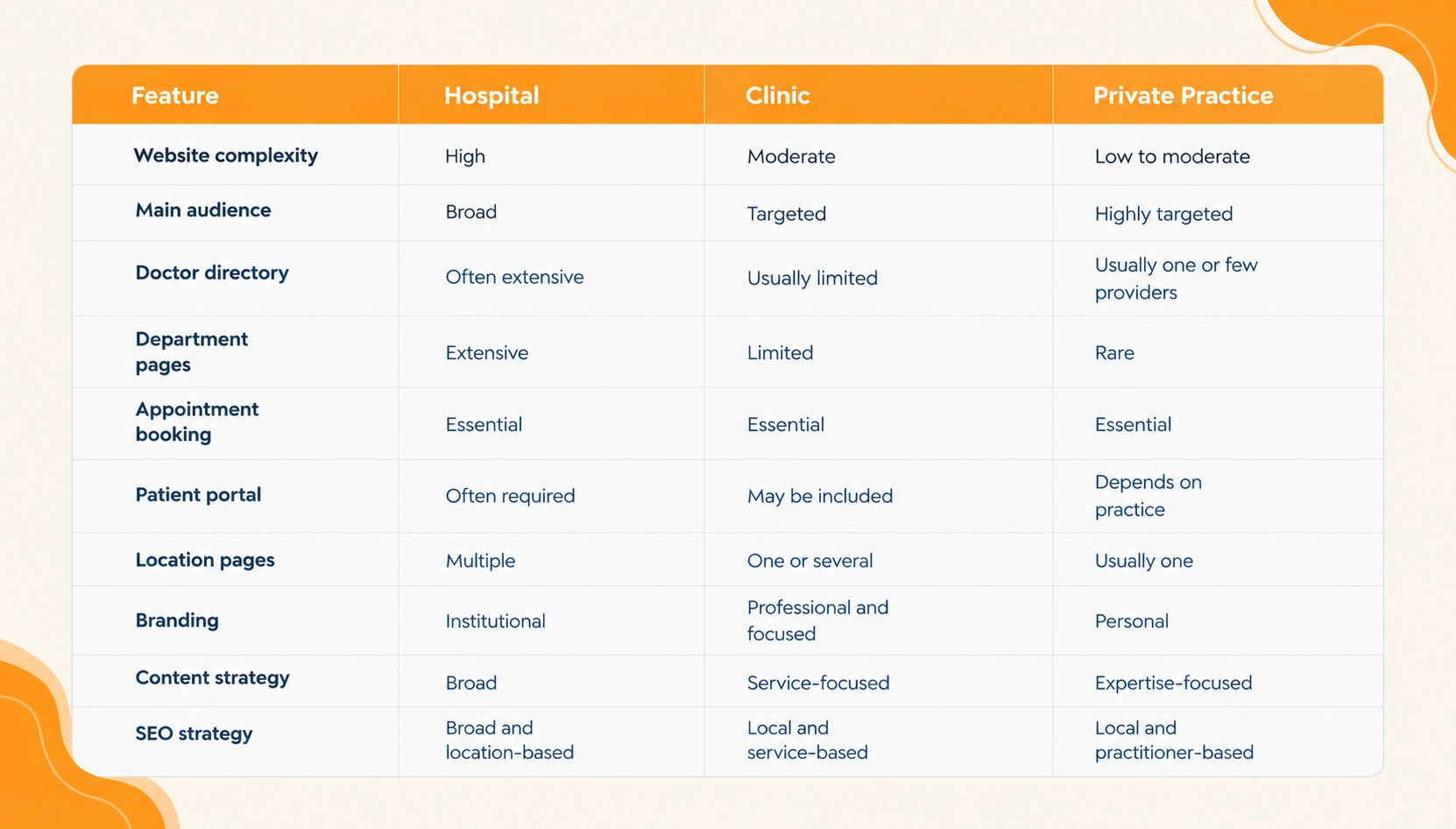
Hospital vs Clinic vs Private Practice: Main Differences
Although the three types of websites under consideration have much in common, they also have significant differences, which are primarily reflected in their priorities.
Key Website Features Every Healthcare Organization Needs
Mobile-Friendly Design
Patients frequently access healthcare websites from smartphones. Text should remain readable, buttons should be easy to tap, and forms should work properly on smaller screens.
Simple Appointment Booking
Appointment requests should be straightforward. Visitors should understand what information is required and what happens after submitting a request.
Clear Contact Information
Phone numbers, addresses, opening hours, email information, and appointment options should be easy to locate. Multiple locations should have clearly separated information.
Doctor Profiles
Doctor profiles help visitors understand the professionals behind the service. Qualifications, specialties, experience, and relevant professional details should be presented consistently.
Accessible Content
Readable typography, sufficient contrast, descriptive image text, labelled forms, keyboard-friendly navigation, and logical page structures can make healthcare websites easier to use.
Fast Performance
Large images, unnecessary scripts, videos, and poorly optimized code can slow down a website. Optimized media, efficient code, caching, and a sensible page structure can improve performance.
How Content and SEO Differ
The content strategy should reflect the organization.
Hospitals generally need broad content covering specialties, departments, conditions, treatments, doctors, facilities, locations, and patient resources.
Clinics can focus on core services, treatments, doctors, FAQs, and local patient questions.
Private practices can combine service information with practitioner-focused content, including educational articles and information about the doctor’s expertise and approach.
SEO should follow the same principle. Hospital SEO tends to operate across a broad content architecture, clinic SEO often emphasizes local and service searches, while private practice SEO can focus on the practitioner’s name, specialty, services, and location.
Building Trust Through Healthcare Website Design
Trust is particularly important when people are choosing a healthcare provider.
A website can support trust by clearly presenting:
- Provider qualifications
- Professional photographs
- Contact information
- Service details
- Patient reviews where appropriate
- Educational resources
- Privacy information
- Relevant policies
- Accurate information
- Reliable functionality
Healthcare content should also avoid exaggerated promises or unrealistic claims. Clear and factual communication is more appropriate for medical services.
Common Healthcare Website Design Mistakes
Complicated Navigation
Too many menu options can make important information difficult to find. Related content should be grouped logically.
Difficult-to-Find Appointment Options
Visitors should not have to search for the booking option after deciding they want an appointment.
Overly Technical Content
Medical terminology can be difficult for patients to understand. Important concepts should be explained in clear, everyday language.
Outdated Information
Incorrect doctor profiles, opening hours, services, addresses, or appointment details can create confusion and reduce confidence.
Poor Mobile Experience
A website that works well on desktop but poorly on mobile can create unnecessary barriers for patients.
Weak Local SEO
Patients often search using both a healthcare service and a location. Clear location information and relevant local optimization can help providers become easier to discover.
Incomplete Doctor Profiles
A profile containing only a name and qualification may not answer the questions patients have. Experience, specialization, services, and relevant professional information can make profiles more useful.
How to Choose the Right Website Structure
The website structure should follow the way patients use the organization.
A hospital journey might look like:
Patient → Find Department → Find Specialist → Explore Service → Book Appointment
A clinic journey could be:
Patient → Explore Service → Find Provider → Check Availability → Book Appointment
A private practice journey may be:
Patient → Learn About Doctor → Understand Treatment → Build Confidence → Request Appointment
These journeys can influence navigation, page structure, content, internal linking, and calls-to-action.
Designing a Website Around Patient Needs
Healthcare websites should be designed around the questions patients actually have.
A visitor may be looking for a doctor, treatment, location, appointment, or answer to a health-related question. The website should make it easy to reach the relevant information.
Useful treatment explanations, FAQs, preparation information, facility details, and appointment instructions can help visitors understand what to expect.
The combination of clear information architecture and useful content is what makes a healthcare website easier to use. Accurate information is equally important because patients and family members may rely on the website when making decisions.
Elevate Patient Experiences With a High-Performing Healthcare Website
A healthcare website should do more than present information. It should help patients find relevant services, understand their options, connect with healthcare professionals, and take the next step.
Whether it is a hospital, clinic, or private practice, the right combination of UX, content, technology, SEO, accessibility, security, and performance can create a stronger digital experience.
Choosing the Right Design Approach for Your Organization
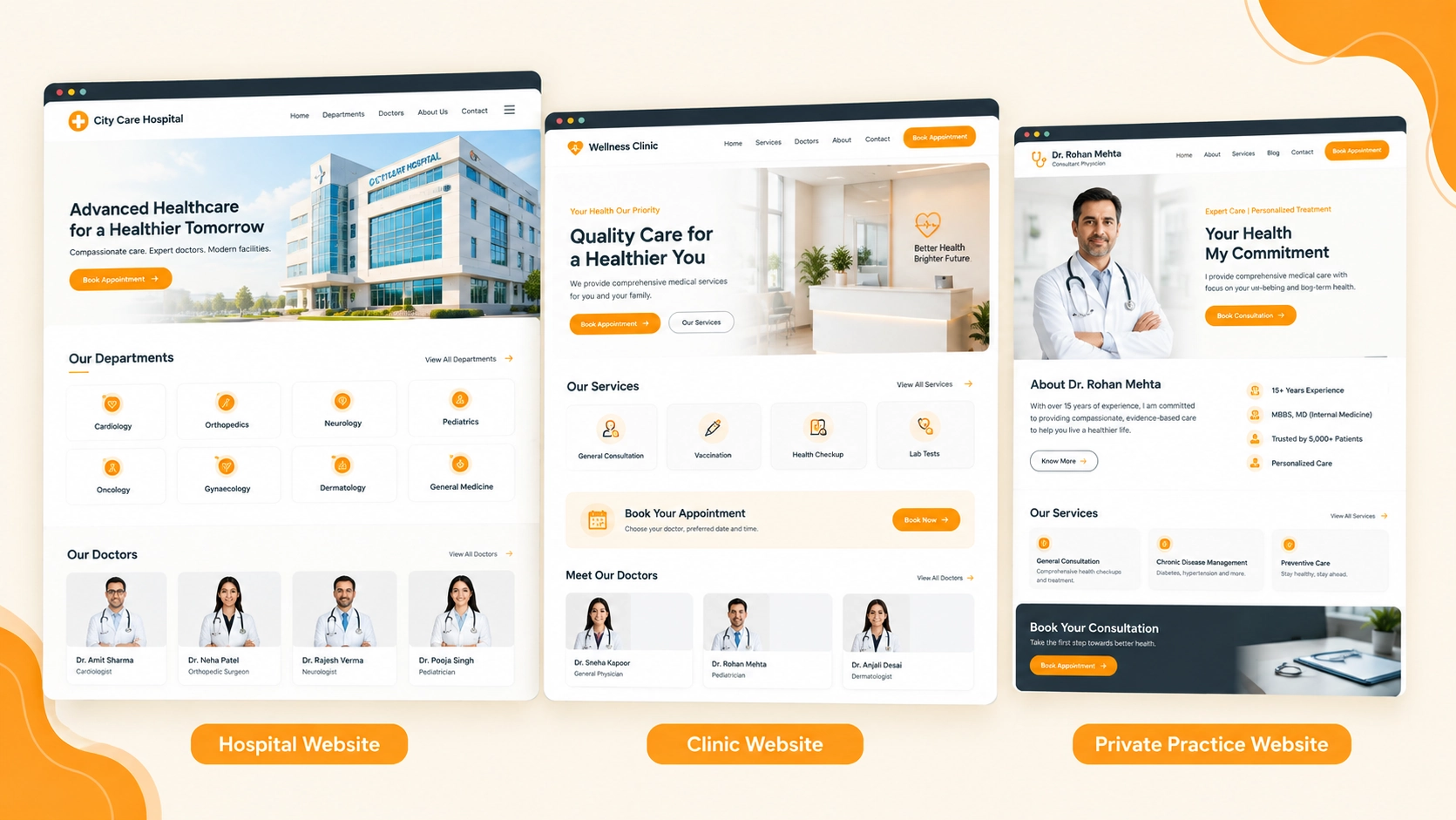
There is no universal template for healthcare website development.
Hospitals may require advanced search, detailed directories, multiple locations, and extensive content. Clinics may need a focused service-driven website with simple appointment journeys. Private practices may benefit from a more personal website built around the practitioner’s expertise and identity.
The starting point should always be the organization, its audience, its services, and the actions visitors need to take.
A successful healthcare website is not defined by the number of pages or features it contains. Its value comes from how effectively it connects people with accurate information, appropriate services, and clear next steps.
Final Takeaway
Hospital, clinic, and private practice websites share the same fundamental purpose: helping people access useful healthcare information. Their digital strategies, however, should reflect their individual needs.
Hospitals need to manage scale and complexity. Clinics need to make services and appointments easy to understand. Private practices can place greater emphasis on professional expertise and personal trust.
Across all three, the fundamentals remain the same: clear information, intuitive navigation, mobile usability, accessibility, security, performance, trustworthy content, and a strong SEO foundation.
The strongest healthcare website is not necessarily the largest or most complicated. It is the one that understands its audience and makes it easier for patients to find the information or service they need.
FAQs
Hospital websites usually need more complex navigation, departments, doctor directories, locations, and patient resources. Clinic websites are generally more focused on services, doctors, and appointments.
A private practice website can focus more on the individual doctor, their expertise, qualifications, services, and professional identity while keeping appointment information easy to access.
Yes. Hospitals typically need broad SEO across departments and treatments, while clinics and private practices often focus more on local, service, and practitioner-related searches.
Essential features include mobile-friendly design, clear contact details, simple appointment options, doctor profiles, accessible content, fast performance, and secure functionality.
For important services, dedicated pages are usually useful because they provide clearer information for patients and create focused opportunities for search visibility.
Start with your services, audience, locations, and patient journey. The structure should make it easy for visitors to find relevant information and take the next step.

