
Contents
- 1. Key takeaways
- 2. Introduction
- 3. What Are Divi AI Agents?
- 4. Divi AI vs Divi AI Agent: the quick comparison
- 5. HIPAA Compliance and Strong Security
- 6. What You Can Build and Edit by Just Asking
- 7. Site-Wide Cleanups: The Real Time-Saver
- 8. Rules, Commands, and Context
- 9. 220+ Divi Skills Under the Hood
- 10. Managing WordPress Without Leaving the Builder
- 11. Where Divi AI Agents Fall Short
- 12. What Divi AI Agents Cost in 2026
- 13. Who Should Use It — and Who Should Wait
- 14. How to Get Started in 6 Steps
- 15. How Divi AI Agents Compare to Elementor AI and Wix AI
- 16. What This Means for Web Designers and Agencies
- 17. FAQs
Key takeaways
- What: Divi AI Agents is an AI agent built into the Divi 5 Visual Builder that takes real actions from plain-English commands — building layouts, editing pages, and managing WordPress.
- When: Launched September 3, 2026, in Divi 5.12.
- Cost: Included with Divi AI (~$115/yr) or Divi Pro (~$236/yr); each plan includes $60/yr of agent usage.
- Best for: Freelancers and agencies on Divi 5 — early testers report 30–50% faster builds.
- Catch: Divi 5 only, metered usage, and it edits live pages (back up first).
Introduction
On September 3, 2026, Elegant Themes did something that most WordPress users didn’t see coming this fast. They shipped Divi AI Agents for Divi 5 — not another “write my headline” text tool, but a real AI agent that lives inside the Visual Builder and actually does the work for you. You type what you want in plain English, and it builds layouts, edits modules, cleans up your pages, and manages your WordPress site while you watch.
If you build websites for a living — or you run a business site and you’re tired of the endless clicking — this is the update worth paying attention to. Below is the honest, no-hype breakdown: what Divi AI Agents actually are, what they can (and can’t) do yet, what they cost, and whether they belong in your workflow.
Quick answer: Divi AI Agents is an AI-powered command interface built into Divi 5 that understands natural language and takes real actions inside the WordPress builder — building layouts, editing designs, running site-wide cleanups, and managing pages, menus, and Theme Builder templates. It launched on September 3, 2026, ships with Divi AI and Divi Pro, and includes $5 of agent usage per month.
What Are Divi AI Agents?
Let’s clear up the confusion first, because there are now two different “Divi AI” things and people are already mixing them up.
Divi AI (the older feature) generates content — copy, images, and code. You ask it for a headline or a hero image, and it hands you text or a picture.
Divi AI Agent (the brand-new September 2026 release) is different in kind, not just degree. It’s an agentic tool. Instead of handing you content to paste in yourself, it takes real actions inside the builder on your behalf. It adds sections, edits modules, changes colours, fixes spacing, creates pages, and updates menus — all from a chat panel, all in plain language.
Think of the difference this way: the old Divi AI is a copywriter and an illustrator. The new Divi AI Agent is a junior web designer sitting inside your builder who actually clicks the buttons for you.
Divi AI vs Divi AI Agent: the quick comparison
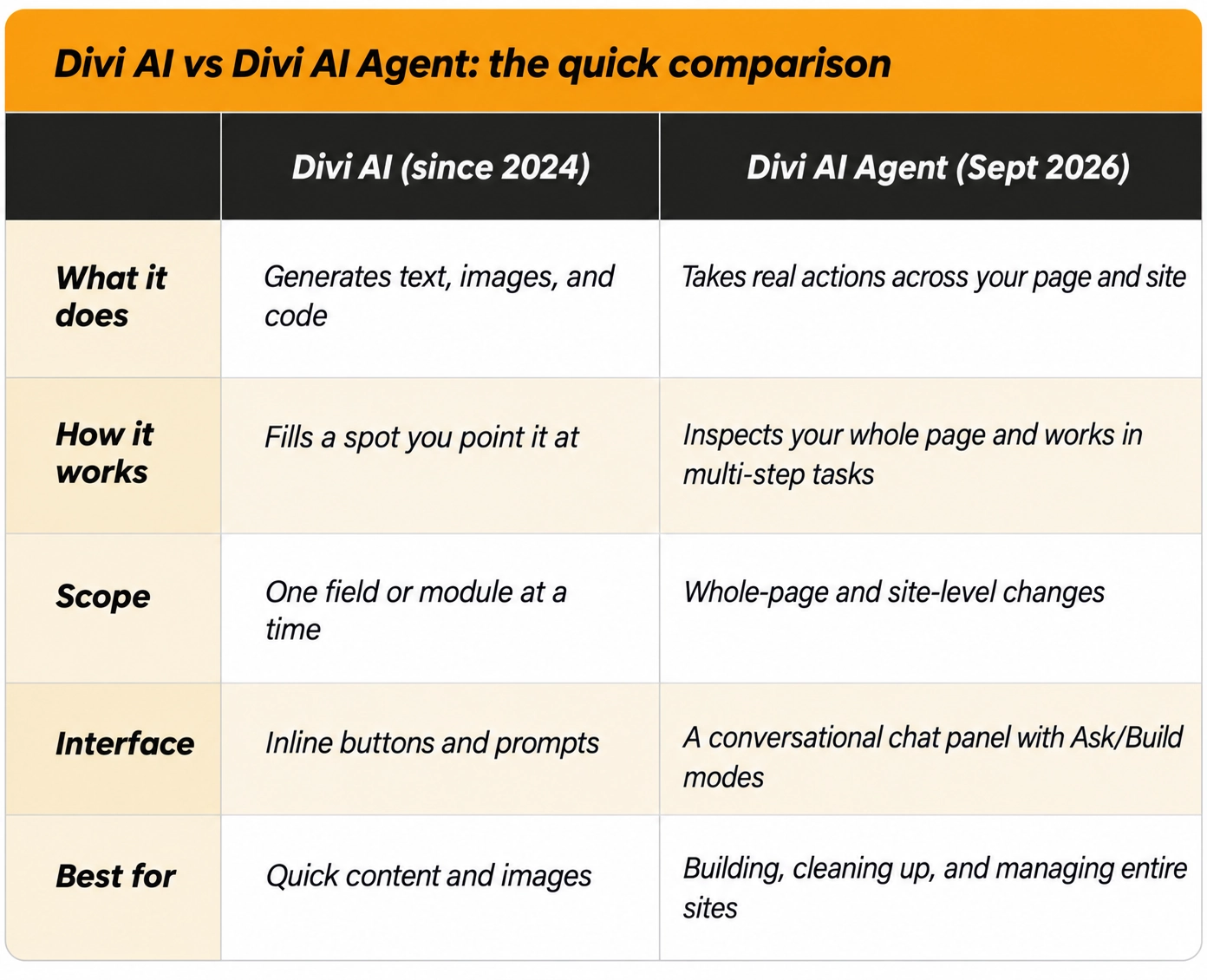
The important part: they aren’t rivals. The agent runs inside the same Divi AI membership and works alongside the older generation tools, not instead of them.
Elegant Themes describes it as “an intelligent command interface built directly into Divi that understands natural language and can take real actions inside the builder.” In practice, it’s a chat window you open with the Agent toggle in the Visual Builder toolbar. You tell it what you want, and it works directly on your canvas — building real Divi sections, rows, modules, and styles that you can keep editing normally afterwards.
That last point matters. The output isn’t a flat screenshot or a locked block of code. It’s editable Divi. You refine it the same way you’d refine anything you built by hand.
HIPAA Compliance and Strong Security
Three things separate this from a generic chatbot bolted onto a page builder.
1. It has two modes: Ask and Build
- Ask mode answers questions and suggests changes without touching your layout. It’s your safe sandbox — a place to plan, diagnose, and get advice.
- Build mode actually makes the changes on your page.
The smart workflow is to start in Ask mode, get the agent to explain what it would do, and only switch to Build once you’re happy with the plan. This alone removes a lot of the “AI went rogue on my homepage” anxiety.
2. It asks before it does damage
The agent uses human-in-the-loop approval for destructive or high-impact actions. Deleting a section, unpublishing a page — these need your confirmation before they happen. You stay in control of anything that could hurt.
3. It runs on purpose-built Divi skills, not guesswork
This is the technical heart of why it works. The agent isn’t a general-purpose AI trying to guess how Divi is structured. It runs on 220+ purpose-built skills for interacting with Divi and WordPress — tools that let it read modules, change settings, manage global variables and presets, control the Theme Builder, and search Divi’s own documentation. For bigger jobs, it can spin up subagents that research modules, scaffold sections, and apply styles in parallel.
On top of that, you’re not locked into one AI model. You can choose from hundreds of available AI models or let Divi automatically pick an efficient one for the task — stronger models for complex builds, faster and cheaper ones for simple edits.
Built-in safety nets
Two smaller features make the agent safer to trust on real projects. Checkpoints and revert let you view past prompt checkpoints, reuse them, and roll your build back to an earlier state if a change goes wrong. And a context-usage indicator shows how much of the conversation’s context is in use, so you know when to start a fresh chat before hitting limits. Combined with the approval step, these turn the agent from a risky experiment into something you can actually run on client work.
What You Can Build and Edit by Just Asking
Here’s where the “change how you build websites” claim starts to earn itself.
Build a full layout from almost anything
You can hand the agent a starting point in several ways:
- Describe a page in plain language — “Build me a SaaS landing page with a hero, three feature blocks, testimonials, and a pricing table” — and let it draft the layout.
- Upload a screenshot or a mockup and have it turned into a real Divi layout.
- Give it a website URL and ask it to recreate a similar design.
- Upload a moodboard or a set of reference images and let it blend their shared style into something new.
Because the result is genuine Divi structure — not an image, not raw code — you continue editing it like any other Divi page.
Edit what's already on the page
The agent is just as useful after the layout exists. Ask it to:
- Redesign a hero section
- Rearrange or clone modules
- Change colours and typography
- Rewrite copy in your brand voice
- Adjust spacing and responsiveness
Because it understands Divi’s structure, you don’t have to explain where every setting lives. It also works with Divi’s design systems — you can tell it to consolidate repeated styles into presets, or replace hard-coded values with global variables to make a site easier to maintain long-term.
As Elegant Themes puts it, something that used to take dozens of clicks is now one sentence away.
Site-Wide Cleanups: The Real Time-Saver
Building the big pieces of a website is only half the job. The other half is the hundred small, boring, unbillable tasks that quietly eat your afternoon. This is where Divi AI Agents genuinely shine, because the agent can inspect an entire page and make coordinated changes in a single pass.
In one prompt, you can ask it to:
- Add missing alt text and improve accessibility settings
- Find inconsistent colours and consolidate them into global variables
- Standardise typography, spacing, and buttons across the page
- Improve responsive layouts across desktop, tablet, and phone
- Fix spelling, grammar, punctuation, and capitalisation
- Refine messaging and calls to action across an entire page
- Find oversized images and other performance-draining assets
- Review custom CSS and JavaScript and clean up unnecessary code
Instead of opening twenty modules to make the same tweak twenty times, you describe the end result and let the agent figure out the work. For anyone who has ever hunted down four almost-identical shades of blue across a client site, this is the feature that pays for itself.
Rules, Commands, and Context
The chat panel isn’t just a prompt box — it’s a workspace designed for repeatable, professional workflows. Three features turn one-off prompts into a real system, and they’re worth setting up on day one.
Rules are persistent instructions the agent follows in every conversation on a site. Define your brand voice, your preferred layout conventions, or which design variables and presets to use — set them once, and stop repeating yourself.
Commands let you save a prompt you run often and trigger it directly from the chat, the way you’d use a slash command in Slack. Accessibility checks, responsive cleanup, content reviews, design-system audits — turn any multi-step routine into a one-click workflow.
Context lets you pull specific pages, modules, or media into the conversation. Click an element on the canvas to add it as context, or attach screenshots when showing is easier than explaining. Conversation history is kept, so you can pick a job back up later without re-explaining the whole site. The more relevant context you give it, the sharper the results.
220+ Divi Skills Under the Hood
It’s worth dwelling on why this launch feels more solid than most “AI added to product X” announcements.
Under the hood, the Divi AI Agent carries more than 220 purpose-built skills for working with Divi and WordPress. These aren’t vague, general AI capabilities. They’re specific tools for understanding Divi modules, modifying settings, working with layouts, managing global design systems, controlling the Theme Builder, interacting with WordPress, and searching Divi documentation.
That’s the difference between an AI that guesses how your builder works and one that has actual, dedicated tools to inspect your site and perform the same actions you’d perform yourself. It’s what allows a natural-language command to reliably become a real, correct change on the page.
Managing WordPress Without Leaving the Builder
The agent reaches beyond the current page to handle site-level tasks that normally mean bouncing between the Divi builder and the WordPress dashboard.
Pages and posts
It can create, update, duplicate, publish, unpublish, and schedule pages and posts straight from the conversation. Real examples that work:
- “Create a new Services page as a draft and add it to the main menu.”
- “Schedule this blog post for next Tuesday at 9 am.”
- “Find all unpublished pages and give me their edit links.”
- “Duplicate the About page and rename the copy to Our Team.”
Menus, templates, and global settings
You can also work with navigation menus, Theme Builder templates, Divi Library items, and Theme Options through the same chat interface — creating and assigning templates, inspecting your configuration, or reorganising navigation without digging through wp-admin.
Built-in Divi support
Finally, the agent doubles as a Divi expert on call. Ask it things like “Should I use Flexbox or Grid for this section?” or “Why isn’t my Theme Builder template applying to this page?” It searches Divi’s documentation and inspects your actual page to give you a specific answer — and in many cases, it can then fix the problem for you on the spot.
Where Divi AI Agents Fall Short
No honest review skips the caveats. Here’s what to weigh before you get carried away.
It’s Divi 5 only. There is no Divi 4 version. If your site is still on Divi 4, the migration comes first — full stop.
It’s thin outside the builder. Elegant Themes is upfront that the “outside the builder” skills are currently limited, because the launch focused on the builder itself. Expect page and menu management to work well. Don’t expect it to run your entire WordPress admin yet.
Usage is metered. Every membership includes $5 of agent spend per month. Elegant Themes’ example is that generating an entire custom layout costs under five cents — so the allowance covers a lot of normal use — but the cost of heavy use beyond the allowance isn’t clearly published yet.
Model choice cuts both ways. Access to hundreds of models is powerful, but quality and speed vary by pick. Leave it on automatic until you have a specific reason not to.
It edits real pages. The approval step covers destructive actions, but treat the agent like a capable new team member: run big cleanups on a staging copy first, keep a backup, and read the changes before you publish. Early users have also noted that results from HTML-file references or very detailed prompts can still be inconsistent — this is a first release, and it shows in the edges.
What Divi AI Agents Cost in 2026
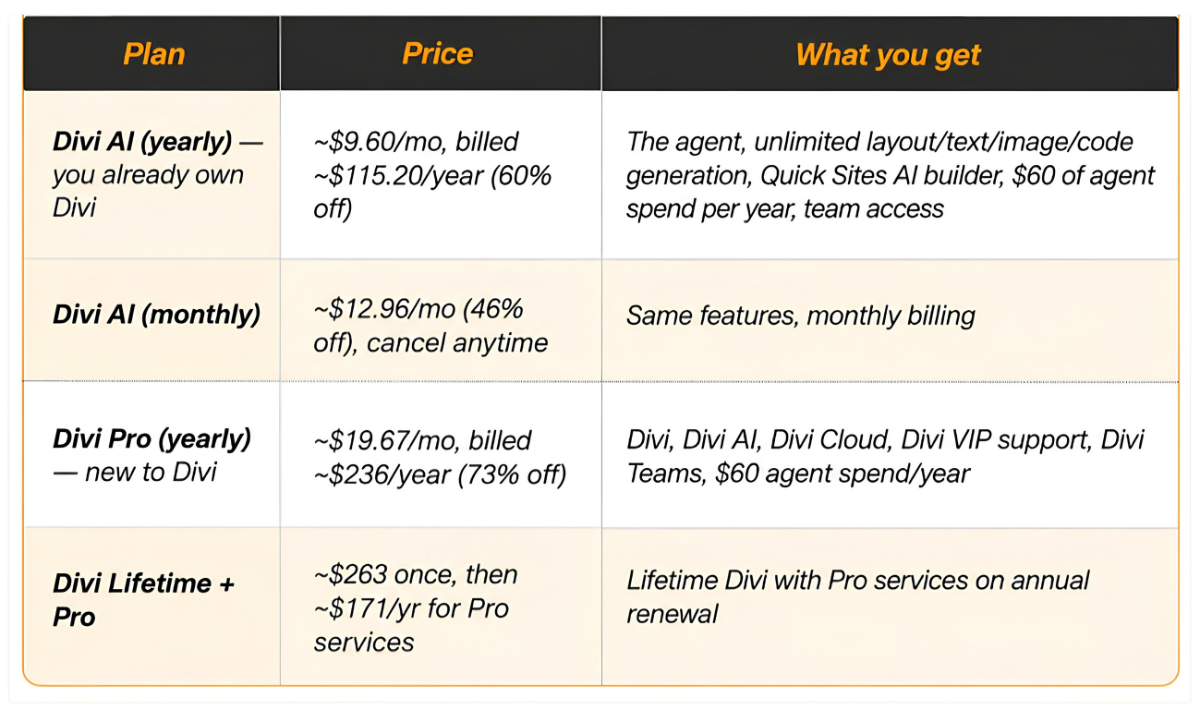
One useful way to frame it: the yearly Divi AI price minus the $60 of included agent spend works out to roughly $55 for the year — if you’d use the agent anyway. Every plan carries a 30-day money-back guarantee.
Who Should Use It — and Who Should Wait
Get it now if:
- You build Divi 5 websites for clients. Page-wide cleanups and layout scaffolding are exactly the hours you can’t bill for.
- You run a content-heavy Divi 5 site and publish or restructure pages every week.
- You already pay for Divi AI or Divi Pro — the agent is included, so the only “cost” is the hour it takes to learn it.
Wait if:
- Your site is still on Divi 4. Migrate first, then decide.
- You depend on third-party Divi modules that haven’t been rebuilt for Divi 5. The agent can’t fix what the builder doesn’t support.
- You touch your site only a few times a year. A single month on the monthly plan for one cleanup makes more sense than committing to the annual.
How to Get Started in 6 Steps
- Update to the latest Divi 5. The agent doesn’t appear on Divi 4.
- Activate Divi AI on your Elegant Themes account, or confirm your Divi Pro membership is active.
- Open a page in the Visual Builder and click the Agent toggle in the toolbar.
Start in Ask mode. Ask it to list your page’s inconsistencies before you let it change anything. - Add two or three rules — your brand colours as variables, your fonts, your spacing scale.
- Switch to Build mode and run one cleanup on a staging copy. Review it, then repeat on the live site.
How Divi AI Agents Compare to Elementor AI and Wix AI
Divi isn’t the only builder chasing AI in 2026 — so where does it land?
Elementor AI focuses mostly on generating content and code snippets and offering design suggestions, but it stops short of an agent that autonomously executes multi-step changes across your whole page. Wix AI (and its ADI-style site builder) is genuinely good at spinning up a first draft of a site fast, but you’re inside a closed platform — you don’t own the code, and you can’t take the site elsewhere.
Divi AI Agent’s distinct position is the combination: an autonomous, action-taking agent that works inside a self-hosted WordPress builder, on real, editable Divi structure that you fully own. For anyone who wants AI speed without giving up WordPress ownership and portability, that’s the gap it fills. The trade-off, as covered above, is that it’s a first release with rough edges and it’s tied to Divi 5.
What This Means for Web Designers and Agencies
Here’s the bigger picture, and it’s why we at WebUncles think this launch matters beyond the feature list.
For years, “AI website builders” mostly meant one of two things: a chatbot that wrote your copy, or a black-box generator that spat out a template you couldn’t really edit. Divi AI Agents is a genuine third path — an agent that works inside a professional builder, on real, editable structure, with you approving the important moves.
For freelancers and agencies, the honest impact isn’t “AI replaces web designers.” It’s that the tedious middle of every project — the alt-text passes, the colour audits, the responsive fiddling, the “duplicate this and rename it” busywork — starts to compress from hours into minutes. The strategy, the taste, the client relationship, the judgment about what a business actually needs — none of that goes away. It becomes a larger share of what you’re paid for.
The web designers who win in this new phase won’t be the ones who resist AI or the ones who blindly trust it. They’ll be the ones who learn to direct it well: setting good rules, writing clear prompts, reviewing output critically, and reinvesting the reclaimed hours into higher-value work.
The age of agentic website building has arrived. The question isn’t whether it changes how you build — it’s whether you’ll be early enough to build the habit before your competitors do.
FAQs
Divi AI Agents is an AI-powered command interface built into Divi 5, launched on September 3, 2026. It understands natural language and takes real actions inside the WordPress Visual Builder — building layouts, editing modules, running site-wide cleanups, and managing pages, menus, and Theme Builder templates.
Yes. It’s a Divi 5 feature designed for the Divi 5 builder. There is no Divi 4 version, so Divi 4 sites need to migrate first.
Yes. It’s included with a Divi AI membership and with Divi Pro. There’s no separate agent product to buy.
It comes with Divi AI (around $115.20/year at the launch discount) or Divi Pro (around $236/year). Both include $60 of agent usage per year and a 30-day money-back guarantee.
It’s the metered model usage behind agent tasks. Every membership includes $5/month ($60/year). Elegant Themes’ example puts a full custom layout at under five cents, so the allowance covers a lot of normal use.
It can change anything the builder can change, which is why Elegant Themes added a human-in-the-loop approval step for destructive actions. Always back up first and run large jobs on a staging copy.
No. Divi AI still includes text, image, and code generation plus the Quick Sites builder. The agent sits alongside them inside the same membership.
Yes. It searches Divi’s documentation and inspects the page you’re working on, so the answers are specific to your site rather than generic.
For agencies building on Divi 5, yes — the biggest gains come from automating unbillable cleanup and layout work, freeing time for strategy and client-facing work. Early testers report initial build times dropping by 30–50%, which compounds fast across multiple client projects.
Yes. You can upload a screenshot, a mockup, or a moodboard, or paste a website URL, and the agent recreates it as a real, editable Divi layout — sections, rows, modules, and styles — rather than a static image.
Yes. The agent keeps prompt checkpoints, so you can revert your build to an earlier state, and it asks for confirmation before destructive actions. For large jobs, still run them on a staging copy and keep a backup.
It depends on your priority. Divi AI Agent is the strongest option if you want an autonomous, action-taking AI inside self-hosted WordPress with full ownership of your code. Wix AI is faster for a hands-off first draft on a closed platform; Elementor AI leans more toward content and suggestions than full execution.

