
Contents
- 1. TL;DR
- 2. Introduction
- 3. What Is an Online Appointment Booking System for Doctors?
- 4. How Online Doctor Booking Works
- 5. Why Do Doctors Need Online Appointment Booking Software?
- 6. Key Benefits of Online Appointment Scheduling
- 7. Essential Features of Doctor Appointment Scheduling Software
- 8. Online Booking vs. Traditional Appointment Scheduling
- 9. How to Set Up an Online Appointment Booking System
- 10. How to Choose the Right Online Doctor Booking System
- 11. Best Practices for Online Appointment Scheduling
- 12. Conclusion
- 13. FAQs
TL;DR
- Online appointment booking systems allow patients to schedule doctor visits through a website, app, or patient portal.
- They reduce repetitive administrative work by automating bookings, confirmations, reminders, cancellations, and rescheduling.
- Key features include doctor availability management, real-time scheduling, calendar integration, patient information collection, notifications, reporting, and mobile-friendly booking.
- Clinics should evaluate usability, security, integrations, scalability, customization, and support before selecting a platform.
- Successful implementation requires accurate schedule configuration, staff training, testing, and ongoing monitoring.
Introduction
Managing appointments manually can be challenging for doctors, clinics, and healthcare organizations. Reception teams often have to handle phone calls, WhatsApp messages, walk-in requests, cancellations, rescheduling, and appointment confirmations while keeping multiple calendars accurate.
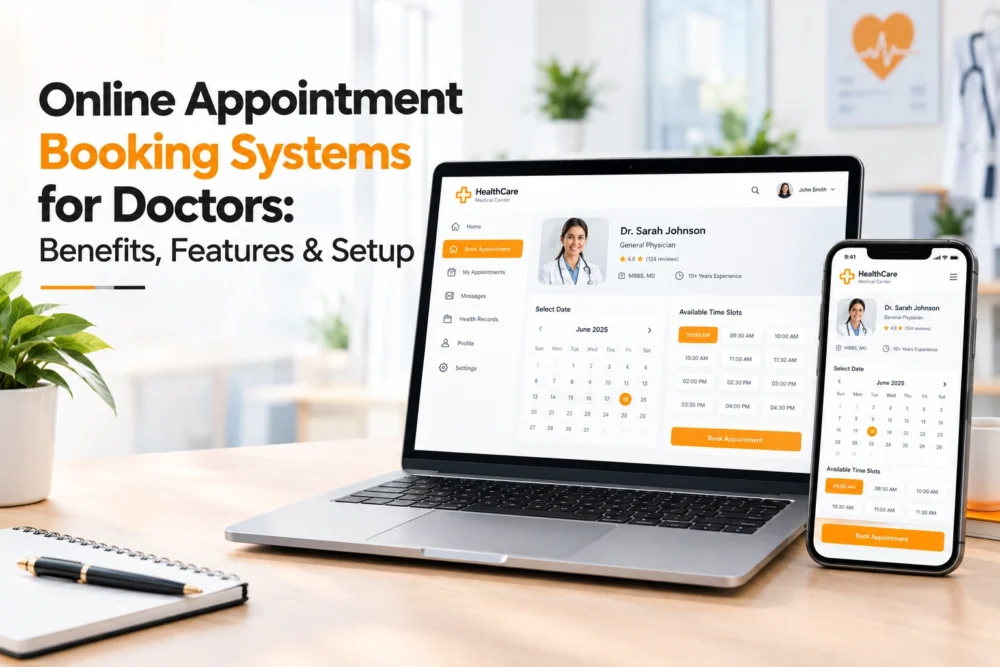
An online appointment booking system for doctors provides a more organized way to manage this process. Patients can check available time slots, select a doctor or service, enter their information, and receive confirmation without depending entirely on reception staff.
For healthcare providers, digital scheduling can centralize calendars, automate reminders, simplify appointment changes, and improve visibility across the practice. When integrated with other healthcare and business systems, it can also become an important part of the overall patient journey.
This guide explains what online doctor appointment booking software is, its key benefits and features, how to implement it, and what clinics should consider when choosing a solution.
What Is an Online Appointment Booking System for Doctors?
An online appointment booking system is a digital platform that allows patients to schedule medical consultations through a website, mobile application, or patient portal.
Instead of calling the clinic during working hours, patients can view available appointments and select a suitable doctor, service, date, and time. Once the booking is completed, the system can automatically add it to the provider’s calendar and send a confirmation.
Depending on the platform, healthcare scheduling software may also support:
- Doctor availability and schedule management
- Appointment confirmations and reminders
- Cancellations and rescheduling
- Patient information collection
- Calendar integration
- Payment processing
- Multiple doctors and locations
- Reporting and analytics
For example, a patient looking for a dermatology consultation can visit a clinic’s booking page, choose dermatology, select a doctor, view available slots, provide the required information, and confirm the appointment. The booking is then recorded in the clinic’s scheduling system.
How Online Doctor Booking Works
A typical online scheduling process includes the following steps:
- The patient opens the clinic’s website, app, or booking portal.
- They select a specialty, doctor, or medical service.
- The system displays available dates and time slots.
- The patient chooses a suitable appointment.
- Required patient information is entered.
- The appointment is confirmed.
- A confirmation and reminder are sent according to the configured settings.
- The appointment appears on the doctor’s or clinic’s calendar.
Staff can still modify or cancel appointments when necessary. This combination of patient self-service and staff control helps reduce unnecessary communication while keeping administrators involved when their assistance is required.
Why Do Doctors Need Online Appointment Booking Software?
Traditional scheduling methods still have a place in healthcare, but relying entirely on phone calls and manual calendars can create unnecessary administrative work. Online scheduling automates many routine tasks while giving patients another way to access appointments.
1. Simplifies Patient Scheduling
Patients can book appointments without waiting for a receptionist to answer a call. This is particularly useful for people who work during clinic hours or prefer digital communication.
Depending on the clinic’s configuration, patients may also be able to book outside normal reception hours.
2. Reduces Administrative Work
Receptionists often spend considerable time confirming appointments, answering availability questions, and handling rescheduling requests. Automation can reduce these repetitive tasks and allow staff to focus on patients and other operational responsibilities.
3. Helps Manage No-Shows
Automated reminders can notify patients before their appointments. Confirmation messages and easy cancellation or rescheduling options can also help clinics manage changes more effectively.
A booking system does not guarantee fewer no-shows, but reminders can help address avoidable missed appointments.
4. Improves Patient Convenience
Patients can view available appointments and book at a time that suits them. A straightforward digital process can remove unnecessary phone calls and make the initial healthcare experience more convenient.
5. Provides Better Schedule Visibility
A centralized calendar gives doctors and administrative staff a clearer view of upcoming appointments, workloads, blocked periods, and schedule changes. This becomes particularly useful for clinics with multiple providers.
Key Benefits of Online Appointment Scheduling
A well-configured healthcare appointment scheduling system can support several areas of clinic operations
Improved Operational Efficiency
Automated scheduling reduces manual calendar management and repetitive administrative tasks.
24/7 Booking Availability
Patients can access the booking interface outside traditional reception hours, depending on the clinic’s configuration.
Fewer Scheduling Errors
Digital scheduling rules can help prevent duplicate bookings, incorrect time slots, and other common manual errors.
Better Appointment Management
Authorized staff can confirm, reschedule, cancel, or block appointments from a centralized system. Some platforms also support recurring schedules and appointment history.
Mobile Accessibility
A mobile-friendly booking interface allows patients to schedule appointments using smartphones, tablets, or computers.
Better Resource Management
Advanced systems can coordinate doctors, rooms, services, appointment durations, and locations, helping clinics organize available resources.
Centralized Information
Instead of managing spreadsheets, paper notes, phone messages, and separate calendars, staff can manage scheduling information through one platform, subject to appropriate access controls.
Essential Features of Doctor Appointment Scheduling Software
The right features depend on the size and workflow of the healthcare organization. However, several capabilities are commonly important.
1. Doctor Availability Management
Administrators should be able to configure individual working hours, breaks, holidays, leave periods, and blocked time for each doctor.
2. Real-Time Appointment Availability
Patients should see current availability so they do not select a slot that has already been taken.
3. Multiple Doctor and Specialty Management
Multi-specialty clinics need separate profiles, services, schedules, and availability for different providers.
4. Service Selection
Patients should be able to select the relevant specialty or service, such as cardiology, dermatology, dentistry, pediatrics, orthopedics, gynecology, or general medicine
5. Automated Confirmations and Reminders
The system should be able to send booking confirmations and reminders containing important appointment details, such as the doctor, date, time, location, and instructions.
6. Cancellation and Rescheduling
Patients and authorized staff should be able to modify appointments according to the clinic’s cancellation and rescheduling policies.
7. Calendar Integration
Calendar integration can help doctors and administrative teams maintain a consistent view of their schedules.
8. Mobile-Friendly Booking
The booking experience should work smoothly across smartphones, tablets, and desktop devices.
9. Patient Information Collection
Booking forms can collect essential information before the consultation. Clinics should avoid requesting unnecessary information and should follow applicable privacy requirements.
10. Payment Integration
Where applicable, online payment capabilities can allow patients to pay consultation or service fees during the booking process.
11. Reporting and Analytics
Reports can provide insights into appointment volumes, cancellations, no-shows, booking activity, and other operational metrics.
Online Booking vs. Traditional Appointment Scheduling
Traditional scheduling usually depends heavily on phone calls, front-desk staff, and manual calendars. Online booking introduces digital self-service and automation.
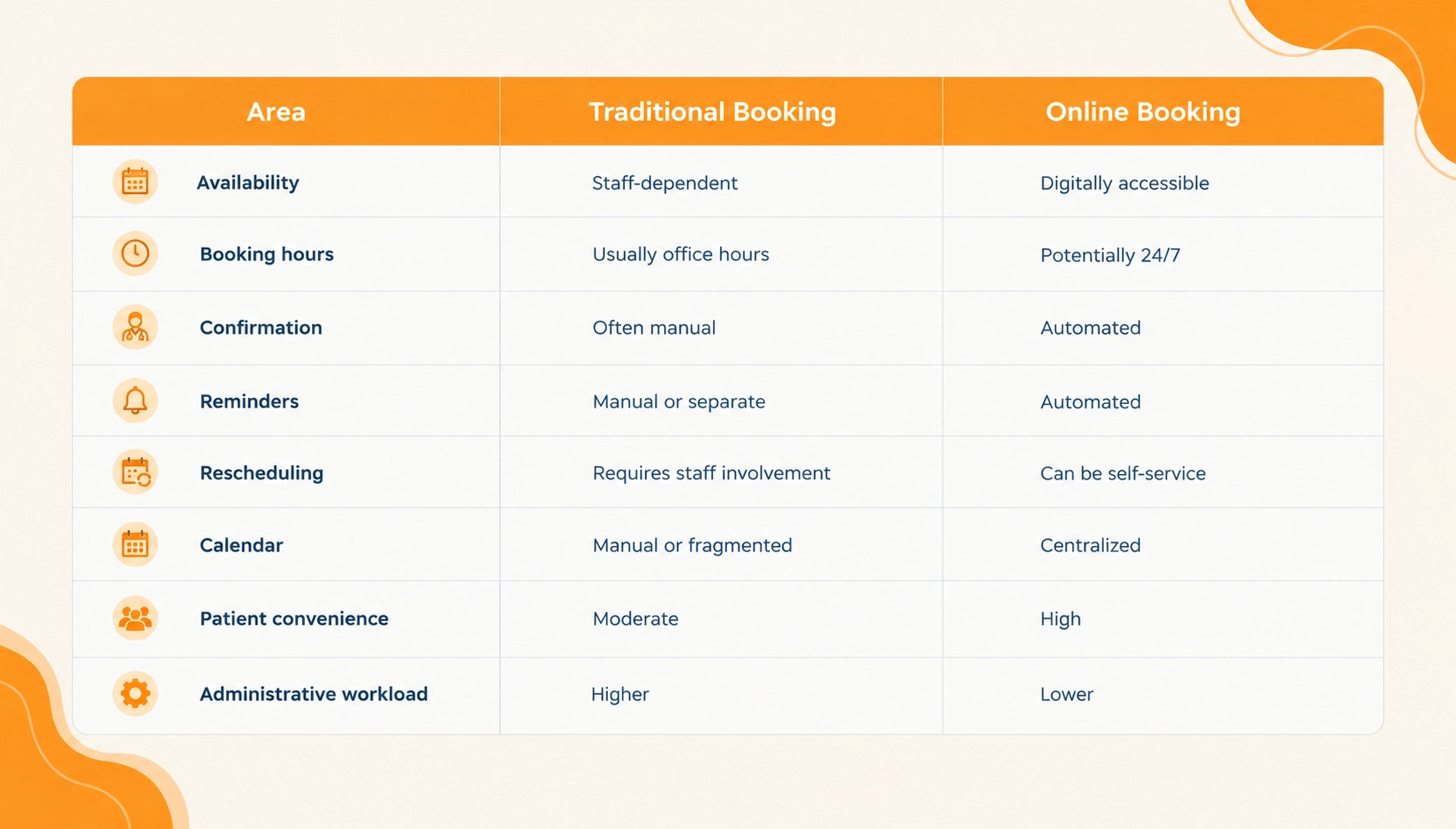
Online scheduling does not eliminate reception staff. Instead, it can reduce routine scheduling work so staff can focus on more complex patient and operational needs.
How to Set Up an Online Appointment Booking System
Successful implementation starts with understanding the clinic’s existing workflow.
Step 1: Define Your Requirements
Document the number of doctors, specialties, appointment types, working hours, locations, appointment durations, cancellation policies, payment requirements, reminder preferences, and administrative roles.
Step 2: Select a Suitable Platform
Compare solutions based on usability, functionality, security, integrations, scalability, support, and total cost. Avoid selecting a system simply because it has the largest feature list. It should fit the clinic’s actual workflow.
Step 3: Add Doctors and Services
Step 4: Configure Availability
Set working days, consultation hours, appointment durations, breaks, holidays, and unavailable periods. Accurate configuration is essential because these rules determine what patients see when booking.
Step 5: Create the Booking Page
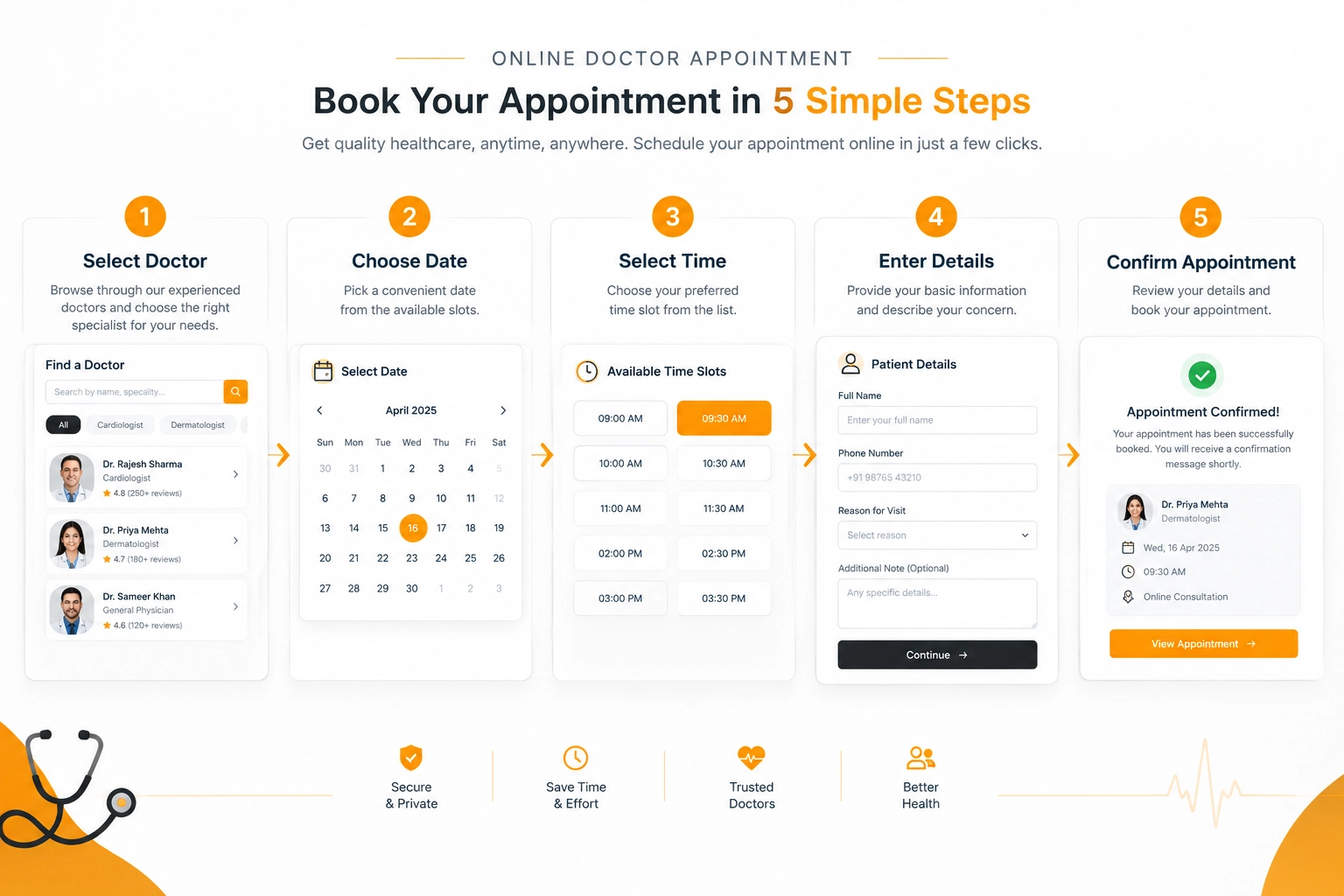
Keep the patient journey straightforward:
Choose Specialty → Select Doctor → Select Date → Select Time → Enter Details → Confirm
Only request information that is necessary for the booking process.
Step 6: Configure Notifications
Set up booking confirmations, reminders, cancellation notifications, and other relevant messages.
Step 7: Test the Booking Journey
Before launch, test the system on different devices and review availability, confirmations, calendar updates, cancellations, rescheduling, notifications, and payments where applicable.
Step 8: Train Staff
Receptionists and administrators should understand how to manage appointments, change schedules, handle cancellations, communicate with patients, and troubleshoot basic issues.
Step 9: Launch and Monitor
After launch, monitor booking completion rates, cancellations, no-shows, schedule conflicts, and patient feedback. Use these insights to improve the process over time.
How to Choose the Right Online Doctor Booking System
Price should not be the only factor when evaluating appointment scheduling software.
Ease of Use
Both patients and staff should be able to navigate the system without extensive training.
Scalability
Consider whether the platform can support additional doctors, specialties, locations, and appointment volumes as the practice grows.
Integrations
Check whether the system can integrate with calendars, payment services, patient management systems, communication tools, or other applications used by the practice.
Security and Privacy
Healthcare information can be sensitive. Review access controls, encryption, audit capabilities, data-handling practices, contractual responsibilities, and compliance requirements applicable to your jurisdiction and use case.
Customization
The ability to configure appointment types, forms, schedules, notifications, and booking rules can make the system more suitable for different clinical workflows.
Reporting and Support
Look for useful operational reports and evaluate the vendor’s documentation, onboarding process, support channels, and expected response times.
Common Appointment Scheduling Challenges
Digital scheduling can solve many problems, but implementation still requires careful management.
Double bookings: Incorrect configuration or poor synchronization can create conflicting appointments. Accurate availability rules and testing can reduce this risk.
Last-minute cancellations: Open slots can become difficult to fill when patients cancel shortly before appointments. Clear cancellation policies and easy rescheduling can help.
No-shows: Reminders and clear appointment confirmations can help patients remember upcoming visits.
Complex schedules: Doctors working across multiple locations or with irregular hours may require advanced scheduling rules.
Poor user experience: A system can have extensive functionality but still frustrate patients if the booking process is complicated. Keep the journey simple and easy to understand.
Best Practices for Online Appointment Scheduling
A successful booking system depends on both technology and implementation.
- Keep the booking process short and intuitive.
- Display accurate, up-to-date availability.
- Optimize the booking experience for mobile devices.
- Use clear calls to action such as “Book an Appointment” or “Choose a Doctor.”
- Provide confirmation with the doctor’s name, date, time, location, and next steps.
- Make cancellation and rescheduling straightforward where appropriate.
- Monitor bookings, cancellations, no-shows, completion rates, and provider utilization.
- Regularly review patient feedback and improve the booking journey.
Conclusion
An online appointment booking system for doctors can modernize one of the most important administrative processes in healthcare: connecting patients with available medical professionals.
By centralizing schedules and automating routine tasks such as confirmations and reminders, digital scheduling can reduce administrative effort while giving patients a more convenient way to arrange consultations.
The right solution should fit the clinic’s workflow rather than simply offering the largest number of features. Usability, security, scalability, integrations, customization, and ongoing support should all be considered before implementation.
For healthcare providers looking to streamline appointment management, a well-planned online booking system can become an important part of a more organized and accessible patient experience.
Streamline Doctor Appointments With a Smarter Online Booking Solution Today.
FAQs
It is a digital platform that allows patients to schedule medical appointments through a website, app, or patient portal. It can manage availability, confirmations, reminders, cancellations, and rescheduling.
Common benefits include greater patient convenience, reduced administrative work, automated reminders, improved schedule visibility, and easier appointment management.
Yes. Depending on the platform’s configuration, patients can access online scheduling outside traditional reception hours.
Yes. Many platforms support multiple doctors, specialties, services, locations, and individual provider schedules.
Many systems support online cancellation and rescheduling. Clinics can configure the rules governing when these options are available.
Important features can include availability management, real-time scheduling, patient booking, confirmations, reminders, cancellation and rescheduling, calendar management, reporting, integrations, and mobile-friendly access.
Implementation time varies according to the number of doctors, integrations, customization, data migration, and testing requirements. A basic setup may be relatively quick, while a customized healthcare scheduling system can require more extensive implementation.
Depending on the platform, it may integrate with calendars, patient management systems, payment services, communication tools, and other healthcare applications.

