
Contents
- 1. Introduction
- 2. WordPress vs Squarespace at a Glance
- 3. What Is the Difference Between WordPress and Squarespace?
- 4. WordPress Pros and Cons
- 5. Squarespace Pros and Cons
- 6. WordPress vs Squarespace Pricing: Which Offers Better Value?
- 7. WordPress vs Squarespace: Features Compared
- 8. WordPress vs Squarespace for Ecommerce
- 9. Squarespace vs WordPress for SEO
- 10. Squarespace vs WordPress for Blogging
- 11. WordPress vs Squarespace: Customer Support
- 12. Top Alternatives Worth Considering
- 13. Final Verdict: WordPress vs Squarespace in 2026
- 14. FAQs
Introduction
Choosing between WordPress.com and Squarespace is one of the most common dilemmas for anyone launching a website in 2026. Both platforms have powered millions of sites for over two decades and promise a polished online presence without code — yet they serve very different audiences.
WordPress.com wins for bloggers and content-first creators with its powerful CMS and budget-friendly plans, while Squarespace wins for online businesses with built-in ecommerce, analytics, and marketing tools that work out of the box. In this comparison, we break down pricing, features, ecommerce, SEO, blogging, and support — so you’ll know exactly which platform fits your goals.
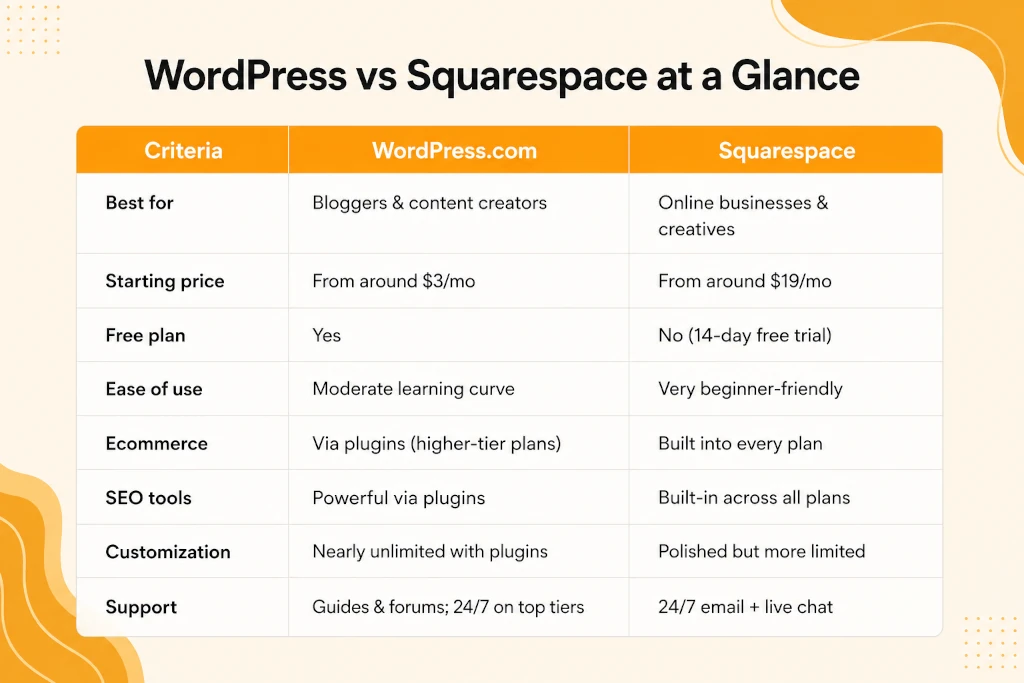
WordPress vs Squarespace at a Glance
If you’re searching for the best website builder overall, the honest answer is: it depends on what you’re building. Let’s dig into the details.
What Is the Difference Between WordPress and Squarespace?
At their core, the two platforms differ in philosophy.
WordPress.com is an open, flexible content management system. It gives you a foundation and lets you extend it endlessly with themes and plugins — but the most powerful capabilities are unlocked on higher tiers.
Squarespace is an all-in-one, closed ecosystem. Hosting, security, templates, ecommerce, analytics, and marketing tools are all bundled together and maintained by one company. You trade some flexibility for simplicity and consistency.
WordPress Pros and Cons
WordPress.com began its journey more than 20 years ago as a blogging platform and has since matured into a full-fledged website builder. Its content tools remain best-in-class, and the template library is easy to customize even without design experience.
Where it stumbles is in its dependence on plugins. Ecommerce, advanced SEO, and marketing features are locked behind Business and Commerce tiers, and support options feel thin unless you’re on a premium plan.
Pros
- Free plan with a customizable subdomain — perfect for testing the waters
- Exceptionally versatile content management system, ideal for publishing at scale
- Deep design flexibility through themes, patterns, and template editing
- Massive plugin marketplace for nearly any functionality you can imagine
- Lower entry pricing than most competitors
Cons
- Plugins (including ecommerce and SEO tools) require higher-tier plans
- Customer support is limited, even on some paid plans
- No native AI website builder
- Costs can creep up as you add premium plugins
Squarespace Pros and Cons
Squarespace’s trade-offs deserve equal scrutiny before you commit. Squarespace launched around the same time as WordPress with a different mission: helping everyday entrepreneurs create professional-grade business websites. Two decades later, it still owns that lane. Its award-winning templates, integrated commerce suite, and genuinely helpful support center make it a favorite among small businesses and creatives.
The trade-offs? Fewer templates than some rivals, more limited customization, no free plan, and pricing that climbs as your business scales.
Pros
- Stunning, professionally designed templates
- All-in-one platform: hosting, security, ecommerce, and marketing included
- Built-in AI tools for site generation, branding, and copy
- Excellent, well-organized help center with live chat support
Cons
- No free plan (only a 14-day trial)
- Customization options are narrower than WordPress
- Higher costs as your business grows
WordPress vs Squarespace Pricing: Which Offers Better Value?
If budget is your deciding factor, this round is refreshingly clear-cut: WordPress.com lets you start smaller and cheaper, while Squarespace charges more upfront but bundles far more into every plan.
WordPress Plans
WordPress.com’s tiers span a wide range, starting with a genuinely useful free tier that includes a customizable subdomain — something few competitors offer. Here’s how the paid tiers stack up:
- Personal: Unlimited pages and users, a free custom domain for the first year, visitor stats, spam protection, newsletters, and 6GB of storage. A solid launchpad for hobby bloggers.
- Premium: Adds faster support, custom fonts and colors, all premium themes, site analytics, video capabilities, ad revenue options, and 13GB of storage.
- Business: The tier where WordPress truly opens up — priority 24/7 support, full plugin access, complete Jetpack tools, SEO and analytics features, and 50GB+ of storage.
- Commerce: Everything in Business plus proprietary ecommerce tooling for serious online stores.
Enterprise: Custom pricing for large-scale organizations.
Squarespace Plans
Squarespace plans skip the free tier entirely, but a 14-day trial (no credit card required) lets you build and customize before paying a cent:
- Basic: Beautiful templates, a free custom domain, AI tools, two contributors, and payment/ecommerce capabilities from day one.
- Core: Unlimited contributors, CSS and JavaScript access, Google Workspace email, enhanced commerce features, shipping and tax services, and analytics.
- Plus: Adds API integrations and reduced transaction fees.
- Advanced: The lowest transaction fees for high-volume sellers.
WordPress vs Squarespace: Features Compared
Strip away the pricing and look purely at what each platform includes, and the story flips.
Squarespace builds its essential features — analytics, SEO tools, professional email, AI site generation — directly into the dashboard on every plan. WordPress.com offers comparable (often more powerful) capabilities, but many arrive via premium plugins that require a Business or Commerce subscription.
WordPress vs Squarespace for Ecommerce
For anyone planning to sell online, this section may be the tiebreaker.
WordPress for ecommerce is powered almost entirely by WooCommerce and companion plugins. It’s remarkably capable — customer accounts, subscriptions, loyalty programs, product reviews, gift cards, and discounts are all achievable. But every one of those features requires a Business or Commerce plan, and many essential plugins carry their own monthly fees. The flexibility is real; so is the mounting cost.
Squarespace for ecommerce, by contrast, was practically built for this. Product catalogs, checkout, subscriptions, gift cards, point-of-sale support, and an extensions library (much of it free) come standard. Add its AI-assisted product descriptions and SEO checklist, and you have a genuinely complete selling machine with no assembly required.
For a growing store, that translates to fewer moving parts, predictable costs, and faster time to launch. If you’re weighing more advanced storefront architectures, custom integrations, or multi-channel selling, explore our E-commerce Solutions to find the right fit for your business model.
Squarespace vs WordPress for SEO
The WordPress vs Squarespace SEO debate splits along the same fault line: built-in simplicity versus plugin-powered depth.
Squarespace for SEO is impressively turnkey. Every plan ships with an SEO checklist, automatic sitemap generation, clean URL structures, and built-in schema markup. Its managed hosting also keeps page speeds consistent — a quiet but crucial ranking factor — with zero configuration on your part.
WordPress for SEO offers a higher ceiling. Once you’re on a business plan, industry-standard plugins like Yoast and Rank Math unlock granular control over technical SEO, content optimization, redirects, and structured data. Serious content publishers often find WordPress ultimately more powerful for search — but that power sits behind a paywall and a learning curve.
Squarespace vs WordPress for Blogging
If publishing content is your primary mission, this round has a clear favorite. WordPress.com was born as a blogging platform, and it shows: superior content organization, categories and tags, RSS feeds, newsletters, paid subscriptions, and reader donations are woven into its DNA. Squarespace’s blogging tools are perfectly serviceable and beautifully presented, but they simply don’t match WordPress’s editorial depth.
WordPress vs Squarespace: Customer Support
Support quality can make or break your experience when something goes wrong at midnight before a launch.
WordPress.com leans heavily on self-service — guides, forums, and tutorials. True 24/7 support arrives only with Business and Commerce plans, and even then, there’s no phone or live chat, so response times can lag.
Squarespace provides 24/7 email support to everyone, plus live chat during business hours. Its help center is also noticeably better organized, making self-service genuinely useful rather than a scavenger hunt.
Top Alternatives Worth Considering
If neither platform feels quite right, several strong WordPress alternatives compete in this space:
- Wix: Arguably the best website builder for absolute beginners, with AI tools that can generate a complete, professional site in minutes and a free plan to start.
- Hostinger Website Builder: Excellent AI-driven building tools, built-in SEO auditing, and zero transaction fees on ecommerce sales.
- Shopify: The heavyweight for large-scale online stores, with dropshipping networks, 100+ payment processors, and robust POS support.
Each has its niche — but for the specific blogger-versus-business decision, the squarespace vs wordpress comparison still covers most use cases.
Final Verdict: WordPress vs Squarespace in 2026
After weighing every category, the squarespace vs wordpress verdict lands exactly where we started — but now you know why:
Choose WordPress.com if:
- Blogging and content publishing are your priority
- You want the lowest possible starting cost (or a free plan)
- You value near-unlimited customization and are comfortable with plugins
- You plan to scale gradually and add capabilities over time
Choose Squarespace if:
- You’re building or migrating an online business
- You want ecommerce, SEO, analytics, and marketing built in from day one
- You prefer a polished, low-maintenance, all-in-one experience
- Responsive customer support matters to you
There’s no universally “best” pick in the WordPress vs Squarespace matchup — only the best pick for your goals. Bloggers will thrive on WordPress; businesses will grow faster on Squarespace.
Still unsure, or short on time? Our team builds high-performing sites on both platforms. Reach out for a professional WordPress development service consultation or explore our Squarespace Website Design offerings to get a site that’s launch-ready from day one.
FAQs
The fundamental distinction is flexibility versus simplicity. WordPress.com is a highly extensible content platform that grows through plugins, while Squarespace is an all-in-one builder with commerce, SEO, and design tools included in every plan.
WordPress.com starts significantly cheaper and offers a free plan with a usable subdomain. Squarespace has no free plan and starts at a higher monthly price, though it bundles more features into that cost. For basic blogging on a budget, WordPress wins; for businesses, Squarespace’s pricing is easier to justify.
For most small and mid-sized sellers, yes. Squarespace includes native commerce tools, POS support, and mostly free extensions on standard plans. WordPress can match or exceed those capabilities through WooCommerce, but only on its top-tier plans and often with additional plugin fees.
Squarespace offers stronger out-of-the-box SEO with checklists, clean URLs, and automatic schema on all plans. WordPress offers deeper technical control through plugins like Yoast, but you’ll need a Business plan to install them. Beginners should learn Squarespace; SEO power users should learn WordPress.
Yes, both platforms support content migration. Before switching, audit the features you actively use — moving from Squarespace to WordPress may mean rebuilding built-in tools with plugins, while moving to Squarespace may mean giving up certain custom plugin functionality.
Absolutely. Designers, photographers, consultants, and established businesses of every size use Squarespace precisely because it delivers a sleek, professional result without requiring code — which was its founding purpose.

